
13 Smart Productivity Apps That Keep Remote Teams Focused and In Sync
Copy this code to embed the top 10:
Remote work thrives on clarity, structure, and seamless collaboration. The right apps can eliminate distractions, streamline communication, and help distributed teams operate like they’re in the same room. Here are 13 standout productivity tools that consistently deliver results for remote professionals.
-
10

Notion
Notion combines documents, project management, wikis, and databases into one highly customizable workspace. Remote teams use it to centralize knowledge, track tasks, and build internal hubs that replace scattered tools. Its flexibility makes it ideal for both startups and large organizations.
-
20

Slack
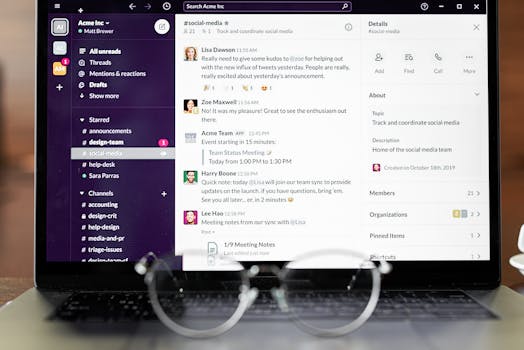
Slack remains a cornerstone of remote communication with organized channels, integrations, and searchable message history. It reduces email clutter and keeps conversations transparent. Features like huddles and workflow automation enhance real-time and asynchronous collaboration.
-
30

Asana
Asana excels at turning team goals into actionable workflows. With timelines, dependencies, and automation rules, it helps remote teams stay aligned on complex projects. Its visual task tracking makes accountability clear across distributed teams.
-
40

Zoom
Zoom became synonymous with remote meetings for its reliability and video quality. Breakout rooms, screen sharing, and recording features make it essential for collaboration and training. It remains a go-to platform for virtual face-to-face interaction.
-
50

Toggl Track
Toggl Track simplifies time tracking with a clean interface and detailed reporting. Freelancers and remote teams use it to measure productivity and bill clients accurately. Its cross-platform availability ensures tracking across devices.
-
Advertisement
-
60

Trello
Trello’s Kanban-style boards provide a visual way to manage tasks and workflows. It’s particularly effective for smaller teams that value simplicity. Power-Ups and automation expand its functionality without overwhelming users.
-
70

ClickUp
ClickUp positions itself as an all-in-one productivity platform with tasks, docs, goals, and dashboards. Its high level of customization allows teams to tailor workflows to their needs. It’s especially useful for fast-scaling remote companies.
-
80
Google Workspace
Google Workspace integrates Docs, Sheets, Meet, and Drive into a collaborative cloud ecosystem. Real-time editing and seamless sharing make it indispensable for remote teams. Its compatibility across devices ensures consistent access anywhere.
-
90

Microsoft Teams
Microsoft Teams blends chat, video meetings, and file collaboration within the Microsoft 365 ecosystem. It’s particularly strong for organizations already using Outlook and SharePoint. Enterprise-grade security adds another layer of reliability.
-
100

Forest
Forest gamifies focus by encouraging users to stay off their phones while growing virtual trees. It’s a surprisingly effective tool for deep work sessions. Remote workers use it to combat digital distractions and maintain concentration.
-
Advertisement
-
110

RescueTime
RescueTime automatically tracks digital activity and provides detailed productivity insights. It helps remote professionals identify time drains and optimize daily schedules. The Focus Session feature actively blocks distracting websites.
-
120

Miro
Miro offers an interactive online whiteboard for brainstorming, strategy mapping, and workshops. Distributed teams use it to replicate the creative energy of in-person collaboration. Its templates make structured ideation sessions easy to run remotely.
-
130

Todoist
Todoist is a powerful yet simple task manager built for personal and team productivity. Features like recurring tasks, priority levels, and project sharing keep remote workers organized. Its minimalist design encourages consistent daily use.
Also ranked in
- 14 Essential Productivity Apps That Make Remote Work Smoother, Smarter, and Saner 12 shared
- 15 Productivity Powerhouses Remote Workers Swear By in 2026 12 shared
- 14 Remote Work Apps That Maximize Deep Focus and Async Collaboration 12 shared
- 15 Essential Productivity Tools Remote Professionals Swear By 11 shared
- 14 Essential Apps That Power High-Performance Remote Teams 11 shared
More Lists You Might Like



Frequently Asked Questions
What features should remote workers look for in a productivity app?
Are all-in-one platforms better than specialized tools?
How can productivity apps reduce burnout in remote teams?
Do small remote teams need enterprise-level tools?
Missing something?
Suggest an addition. Submissions are reviewed before appearing on the list.