
14 Essential Productivity Apps That Make Remote Work Smoother, Smarter, and Saner
Copy this code to embed the top 10:
Remote work offers freedom—but without the right systems, it can quickly become chaotic. The best productivity apps don’t just help you do more; they help you focus better, collaborate clearly, and protect your time. Here are 14 standout tools that consistently deliver for remote professionals across industries.
-
10

Notion
Notion combines notes, project management, databases, and documentation into one highly customizable workspace. Remote teams use it to centralize knowledge, build internal wikis, and manage tasks without juggling multiple platforms. Its flexibility makes it powerful for both solo freelancers and growing distributed teams.
-
20

Asana
Asana excels at turning complex projects into clear, trackable workflows. With timeline views, task dependencies, and automation rules, it keeps remote teams aligned without constant meetings. It’s especially effective for cross-functional collaboration where accountability matters.
-
30

Slack
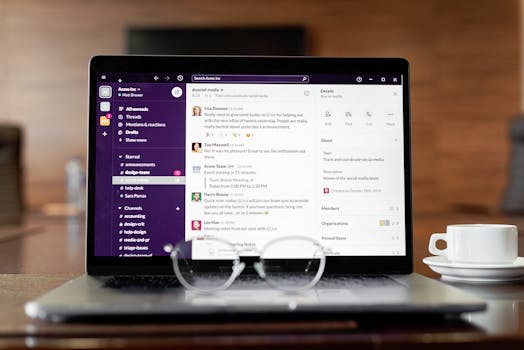
Slack remains a cornerstone of remote communication, organizing conversations into channels and threads. Its deep integrations with tools like Google Drive, Zoom, and Jira reduce context switching. When used thoughtfully, it replaces long email chains with faster, searchable collaboration.
-
40

Zoom
Zoom set the standard for reliable video conferencing during the global shift to remote work. Features like breakout rooms, screen sharing, and meeting recordings make it suitable for everything from team check-ins to client presentations. Its stability and ease of use keep it essential.
-
50

Trello
Trello’s visual Kanban boards make task tracking intuitive and accessible. Remote workers can quickly see what’s in progress, blocked, or completed without complex setup. It’s particularly effective for small teams and creative workflows.
-
Advertisement
-
60

Todoist
Todoist is a streamlined task manager designed for personal productivity. With natural language input, recurring tasks, and cross-device syncing, it helps remote professionals stay organized without clutter. It’s ideal for managing daily priorities alongside team tools.
-
70

ClickUp
ClickUp offers an all-in-one productivity platform with tasks, docs, goals, and dashboards. Its customization options allow teams to tailor workflows to their exact needs. For remote startups looking to consolidate tools, ClickUp can replace several separate apps.
-
80

Microsoft Teams
Microsoft Teams integrates chat, video meetings, and file collaboration within the Microsoft 365 ecosystem. For organizations already using Outlook, Word, and SharePoint, it creates a seamless digital workplace. Its enterprise-grade security also appeals to larger remote teams.
-
90

RescueTime
RescueTime automatically tracks how you spend time on your devices and provides detailed productivity reports. Remote workers gain visibility into distractions and focus patterns. This data-driven insight helps build healthier, more efficient work habits.
-
100

Clockify
Clockify is a straightforward time-tracking tool popular with freelancers and distributed teams. It allows users to log hours by project and generate reports for billing or analysis. Its generous free tier makes it especially attractive for small teams.
-
Advertisement
-
110
Google Workspace
Google Workspace brings together Gmail, Docs, Sheets, Drive, and Meet for real-time collaboration. Multiple users can edit documents simultaneously, reducing version confusion. For remote teams, its cloud-first design ensures work is accessible from anywhere.
-
120

Miro
Miro provides a virtual whiteboard for brainstorming, workshops, and visual planning. Distributed teams use it for design sprints, mind maps, and strategy sessions. It recreates the creative energy of in-person collaboration in a digital format.
-
130

Zapier
Zapier automates repetitive tasks by connecting apps and triggering workflows between them. For example, it can automatically create tasks from emails or sync leads into a CRM. This automation saves remote workers significant time and reduces manual errors.
-
140

Forest
Forest gamifies focus by encouraging users to stay off their phones while a virtual tree grows. It’s simple but surprisingly effective for maintaining deep work sessions at home. For remote professionals battling digital distractions, it adds a motivational twist.
Also ranked in
- 15 Productivity Powerhouses Remote Workers Swear By in 2026 13 shared
- 14 Remote Work Apps That Maximize Deep Focus and Async Collaboration 13 shared
- 15 Essential Productivity Tools Remote Professionals Swear By 12 shared
- 13 Smart Productivity Apps That Keep Remote Teams Focused and In Sync 12 shared
- 13 Remote Work Apps That Solve Real-World Work-From-Anywhere Challenges 12 shared
More Lists You Might Like




Frequently Asked Questions
What types of productivity apps are most useful for remote workers?
Are free versions of these apps enough for most remote professionals?
How can I avoid app overload while working remotely?
Do productivity apps actually improve focus?
Missing something?
Suggest an addition. Submissions are reviewed before appearing on the list.